How to Fix DStv Error E30-4: Complete Guide to Resolve Subscription Verification Issues
Are you staring at your TV screen, frustrated by the “DStv Error E30-4” message? This common error pops up on DStv decoders across Africa, interrupting your favorite shows and sports events. But don’t worry—it’s usually a quick fix related to subscription verification. In this comprehensive guide, we’ll explain what the E30-4 error means, its common causes, and step-by-step solutions to get you back to watching in no time. Whether you’re a new subscriber or dealing with a reactivation, we’ve got you covered with proven methods from official sources and user experiences.
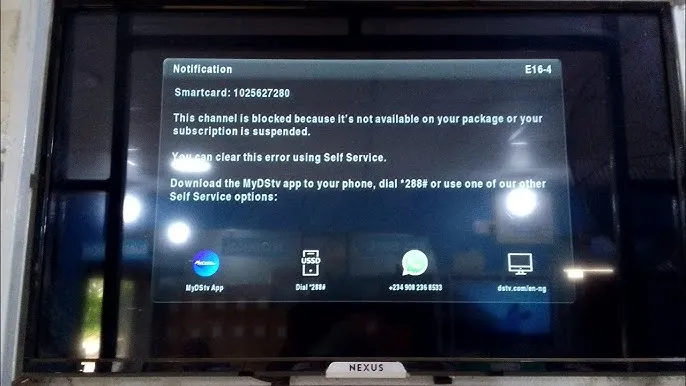
Related post: Ultimate Guide to Fixing DStv Error E16-4: Causes, Solutions, and Prevention
What Does DStv Error E30-4 Mean?
The E30-4 error code on your DStv decoder indicates that your subscription is in the process of being verified. This message typically appears when the system is confirming your payment or activation status, and it should resolve automatically within a few minutes. According to official DStv documentation, this verification can take up to 5 minutes, but in some cases, it might extend to 15 minutes.
If you’ve recently made a payment, reactivated your account, or installed a new decoder, this error is a standard part of the activation process. It’s not a hardware fault but rather a temporary communication hiccup between your smart card and DStv’s servers.
Common Causes of DStv Error E30-4
Understanding the root cause can help prevent future occurrences. Here are the most frequent reasons for this error:
- Recent Subscription Changes: If you’ve just paid your bill, upgraded your package, or reactivated a suspended account, the system needs time to update.
- Decoder Reset or Reinstallation: After a factory reset, smart card reinsertion, or new setup, verification is required.
- Network or Signal Issues: Poor satellite signal or internet connectivity (for connected decoders) can delay the confirmation process.
- Smart Card Problems: A faulty or incorrectly inserted smart card might trigger the error.
- Server-Side Delays: High traffic on DStv’s end, especially during peak payment periods, can slow down verification.
Related search: How to Fix DSTV Error Code E48-32: Ultimate Guide to Restoring Your Signal
Step-by-Step Solutions to Fix DStv Error E30-4
Follow these troubleshooting steps in order. Start with the simplest ones, as most users resolve the issue without advanced intervention.
1. Wait It Out
- The error often clears itself. Leave your decoder powered on and tuned to a viewable channel (like Channel 100 or 101) for 5-15 minutes.
- Avoid switching channels or turning off the device during this time.
2. Reboot Your Decoder
- Unplug the decoder from the power source for at least 30 seconds.
- Plug it back in and wait for it to restart. This can refresh the connection and speed up verification.
3. Check and Reinsert Your Smart Card
- Turn off the decoder.
- Remove the smart card, clean it gently with a soft cloth, and reinsert it with the chip facing down.
- Power on the decoder and check if the error persists.
4. Clear the Error Using DStv Self-Service
- Via SMS: Send “E30” followed by your smart card number to 30333 (in South Africa) or the equivalent short code in your country (e.g., 30333 in Nigeria). Ensure your decoder is on Channel 100.
- Via MyDStv App: Download the app, log in with your account, go to “Fix Errors,” and select E30-4. This sends a reset signal to your decoder.
- Online Portal: Visit the DStv website, log in to your account, and use the “Fix Error” option under self-service.
5. Tune to a Specific Channel
- Switch to Channel 100, 101, or 154 and leave it there for a few minutes. This allows the decoder to receive activation signals from DStv’s broadcast.
6. Contact DStv Support
- If none of the above works after 15 minutes, reach out to DStv customer care via phone, WhatsApp, or live chat. Provide your smart card number and error details for faster assistance.
Tips to Prevent DStv Error E30-4 in the Future
- Pay your subscription on time to avoid suspensions that lead to reactivation errors.
- Keep your decoder connected to a stable power source and satellite signal.
- Regularly update your contact details in your DStv account for seamless notifications.
- Use auto-payment options to prevent lapses.
Frequently Asked Questions (FAQs)
How long does it take for E30-4 to clear?
Usually 5-15 minutes, but it can take longer during high-traffic periods.
Is E30-4 the same as E16 or E32?
No, but they’re related to subscription issues. E16 means service suspended, while E32 indicates validation in progress.
Can I fix this without internet?
Yes, via SMS or by waiting/rebooting.
If you’re still facing issues after trying these steps, it might be a deeper problem like a damaged smart card—contact DStv for a replacement. Bookmark this guide for future reference, and share it with fellow DStv users. Happy viewing!